
Your Acticheck, out and about
At home, your wristband talks to your base station. With the free Acticheck app on your phone, it keeps working when you go out: if you need help, or the band detects a fall, the app passes the alert on and your responders receive your location.
- Free to download and use
- Light on data: about 2 MB a month
- Light on battery: designed to run all day in the background
Who needs the app?
The wearer. Install it on the phone you carry when you go out. That’s the phone that keeps you protected away from home.
Family and responders. You don’t need the app to receive alerts: they come to you by text message and email, with a map link showing where the wearer is. The app does give you a one-tap shortcut to My Acticheck, if you’d find that handy.
How it works
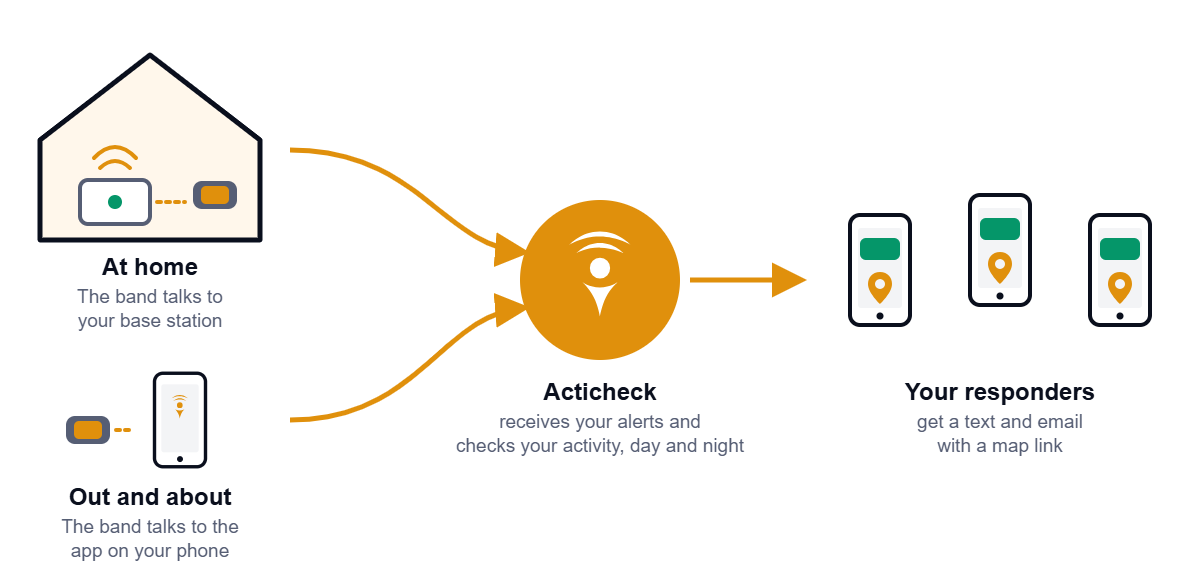
- At home, your wristband talks to your base station, as it always has.
- When you go out, your wristband talks to the app on your phone instead, over Bluetooth.
- Your phone passes alerts on to Acticheck using its mobile data or Wi-Fi, together with your location. Your responders are told straight away by text message and email.
When you come home, the base station takes over again by itself.
Choose your phone
Android
New app, now on Google Play. For Android phones running Android 11 or newer.
iPhone
On the App Store.