

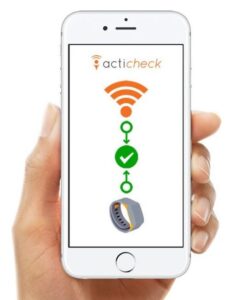
 If your phone has a signal and you’ve connected your life-saving wristband with the app, you can call for help and your responders will be told your location.
How the app works
With the Acticheck app installed and your wristband linked, you can go anywhere and have all the confidence that your wristband gives you at home.
Rather than loading the band with all the technology that you already have in your phone, the app enables you to share the geo-location and data capability of your phone to continue to deliver alerts, fall monitoring and wellness checks wherever you have phone coverage.
The phone uses tiny amounts of data from your data plan. Most people will not even notice the 2MB of data usage a month and we have also been careful to conserve your phone battery.
We do need you to give the Acticheck app the following permissions:
Location so a responder knows where you are.
Mobile data, so the system can communicate with the wider world
The mobile phone number of the phone, which will be shared with a responder in the event of an alert
Autostart should be enabled if your phone has it.
Battery optimisation should be turned off for the Acticheck app to ensure it is not closed down when running in the background.
We recommend that you leave the app running at all times. It uses only a small amount of the phone battery and will be available when you need it.
Your band will remain connected to the app until the connection to the app is unavailable, when it will try and reconnect to your base.
When connected to the app your latest location will be shown on your MyActicheck web page. If you raise an alert the location will be provided to your responders as a link to Google maps in an SMS and email.
If you disable any of the required permissions the app will not work. This app should not be used as a failsafe.
IMPORTANT: Please follow the instructions in the links below to ensure there is a resilient app function.
Before going out with your app
The Acticheck app enables you to remain connected while you are away from home. Here is a brief guide to make sure you remain covered.
Before you leave home, check your phone has enough battery for the time you’ll be away. Open the Acticheck app and click on the word ‘OK’ if you get the initial warning message.
These screenshots are from an Android phone. An iPhone may look a little different, but the principles are the same.
1. Band connected at home
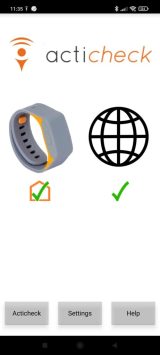 The tick indicates that the band is connected, but it has a house behind it, which means the band is connected via the base station.
2. Press and hold a single wristband button for 8–10 seconds
This forces the wristband to try to communicate with the app.
3. Band connected via phone
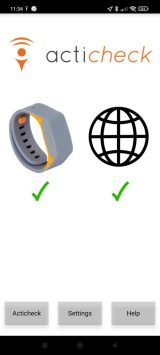 The tick without a house indicates that the band is connected via your smartphone.
That’s it. You have confirmed the app is working and you are covered.
We recommend that you never close the app, just in case you forget to do the checks above.
If your wristband still doesn’t connect with your phone, restart your phone, then the app, and then press and hold a single wristband button for 8–10 seconds.